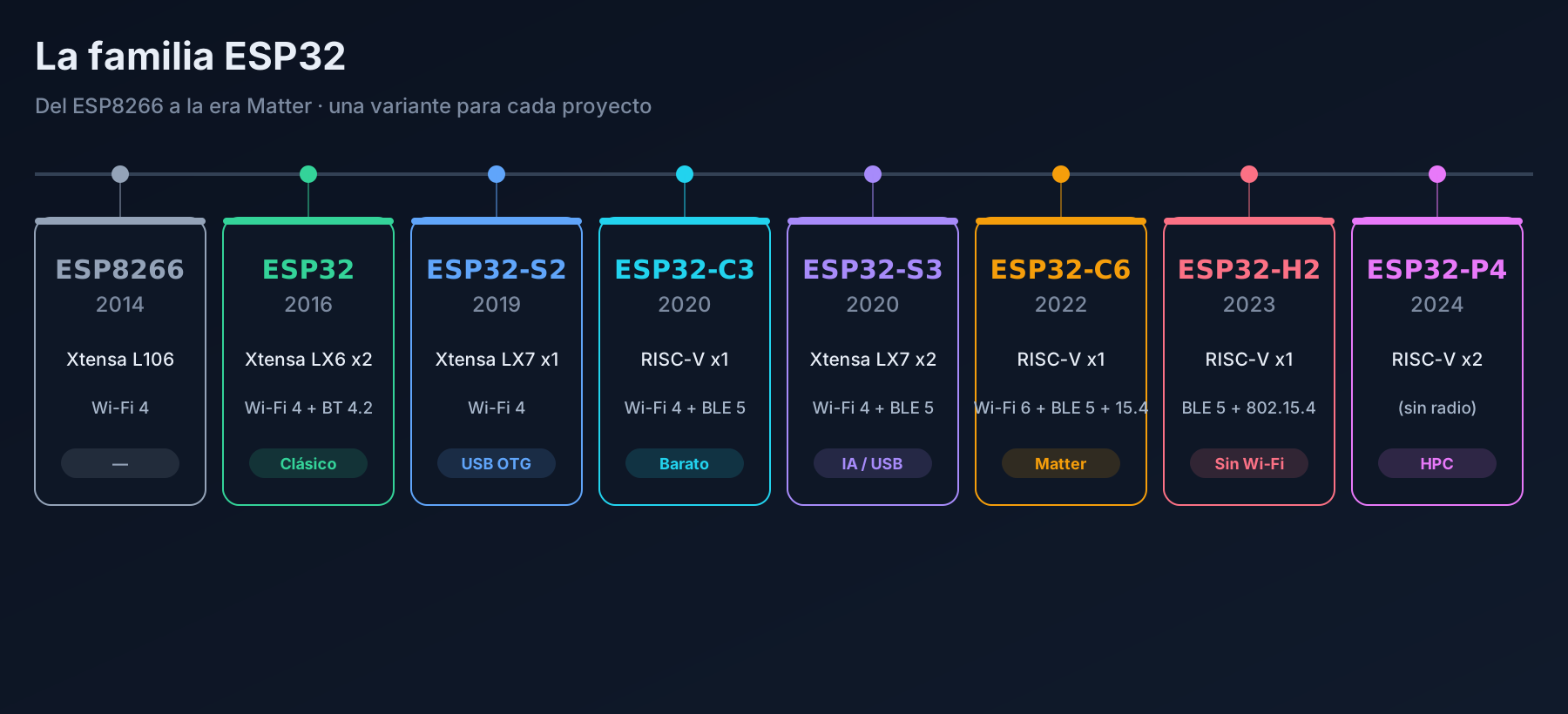
The ESP32-P4 breaks the family mould: it has no Wi-Fi, no Bluetooth, no 802.15.4. No radios at all. In exchange, it is the most powerful ESP32 ever made and the first one designed as an application processor: displays, interfaces, light video and compute.
It sounds odd for an ESP32… until you get the trick: you choose the radio. Put a C6 next to it and you get the best of both worlds.
What it is
| Thing | Value |
|---|---|
| Cores | 2 × RISC-V @ 400 MHz |
| SRAM | 768 KB on-chip (+ 8 KB TCM) |
| Radio | none (Wi-Fi/BT via a separate chip) |
| GPIOs | 55 |
| USB | OTG 2.0 high-speed |
| Others | MIPI-CSI/DSI, Ethernet, SDIO, CAN |
| AI | AI extensions + FPU |
Two details set it apart: MIPI-CSI/DSI (real camera and display interfaces, not SPI) and high-speed USB.
You add the radio yourself
The P4 deliberately ships no connectivity. The usual setup pairs it with a C6 (which has Wi-Fi 6, BLE and 802.15.4) and splits the work:
- The P4 handles the display, the camera and the logic.
- The C6 handles talking to the world.
That is why the official kit, the ESP32-P4-Function-EV-Board, already includes a C6.
Pins: plenty
With 55 programmable GPIOs, this chip does not have the pin shortage of its smaller siblings. It also brings blocks for SPI, I2C, I2S, UART, CAN, SDIO, Ethernet (RMII) and the MIPI interfaces. For the exact mapping, the Espressif datasheet is the reference.
One important note: it does have an ADC, but forget the Wi-Fi that broke ADC2 on other models — there is no radio here to interfere.
Boards
- ESP32-P4-Function-EV-Board — evaluation board with an integrated C6, a MIPI display and a camera. The easiest way to start.
- ESP32-P4-Module — for your own PCBs.
When to pick it (and when not to)
Yes, pick the P4 if…
- You are driving large or touch displays (MIPI, not slow SPI).
- You need a real camera, with MIPI-CSI.
- You want high-speed USB, Ethernet or heavy compute.
- You split the project into processor + radio (P4 + C6).
Do not pick it if…
- You want something simple with Wi-Fi: a C3 or C6.
- You want the cheapest: the P4 is not it.
- You do not need a display or heavy compute: you would be overpaying.
- You expect on-board connectivity: it has none (and that surprises people).
Typical mistakes
- Buying it expecting built-in Wi-Fi (it has none; you need the C6).
- Driving a serious display over SPI when you have MIPI-DSI available.
- Forgetting it is a new chip: it needs a recent toolchain (ESP-IDF 5.3+, today 6.1).
Summary
- Two RISC-V cores at 400 MHz, 768 KB SRAM and 55 GPIOs.
- MIPI-CSI/DSI, USB 2.0 HS and Ethernet.
- No radio: pair it with a C6.
- It is the chip for HMI, displays and high performance, not a dumb sensor.
- If you are torn between P4 and S3: the S3 is cheaper and already has radios; the P4 is for when you need a real display.
Next step: we close the variants block with ESP8266 vs ESP32 and then move on to frameworks. Or go back to the series hub.